

Collecting Data in UrbanVerse#
UrbanVerse provides comprehensive tools for collecting offline data from simulation scenes, including RGB images, depth images, point clouds, semantic segmentation, bounding boxes, instance segmentation, and surface normals. This data collection system follows Isaac Sim’s sensor and rendering architecture.
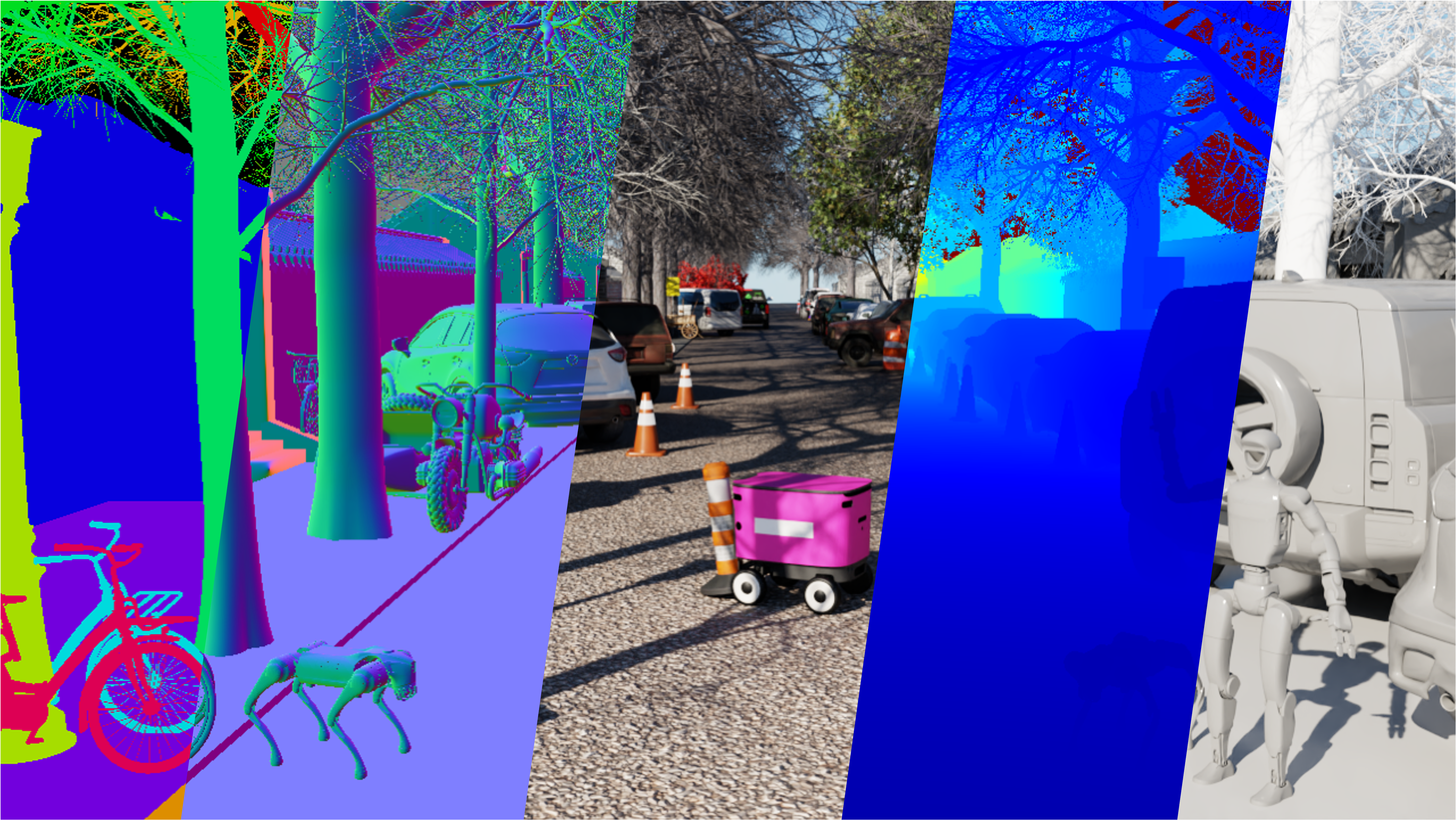
Overview#
UrbanVerse’s data collection system enables you to:
Collect multi-modal sensor data from UrbanVerse scenes
Generate ground truth annotations (semantic segmentation, bounding boxes, etc.)
Export data in standard formats for training and evaluation
Batch process multiple scenes for large-scale dataset creation
This is useful for training perception models, generating synthetic datasets, and conducting offline analysis of UrbanVerse environments.
Supported Data Types#
UrbanVerse supports collecting the following data types:
RGB Images: Color images from camera sensors
Depth Images: Depth maps from depth cameras
Point Clouds: 3D point cloud data (PCL, PLY formats)
Semantic Segmentation: Pixel-level semantic labels
Instance Segmentation: Instance-level segmentation masks
Bounding Boxes: 2D and 3D bounding box annotations
Surface Normals: Surface normal maps
Basic Usage#
Collect data from a single scene:
import urbanverse as uv

# Configure data collection
collection_config = uv.data.collect(
    scene_path="/path/to/UrbanVerse-160/Tokyo_0001/scene.usd",
    output_dir="data_collection/tokyo_001",
    data_types=["rgb", "depth", "semantic", "bbox"],
    num_samples=1000,
    camera_config={
        "resolution": (480, 640),
        "fov": 60.0,
        "position": (0.0, 0.0, 1.5),  # Camera height
    },
)

# Run collection
collection_results = uv.data.run(collection_config)
print(f"Collected {collection_results['num_samples']} samples")
API Reference#
Configure Data Collection#
uv.data.collect(
    scene_path: str,
    output_dir: str,
    data_types: list[str],
    num_samples: int,
    camera_config: dict,
    robot_type: str | None = None,
    sampling_strategy: str = "random",
) -> DataCollectionConfig
Parameters:
scene_path (str): Path to USD scene file
output_dir (str): Directory to save collected data
data_types (list[str]): List of data types to collect: -
"rgb": RGB images -"depth": Depth images -"pointcloud": Point clouds -"semantic": Semantic segmentation -"instance": Instance segmentation -"bbox": Bounding boxes -"normal": Surface normalsnum_samples (int): Number of samples to collect
camera_config (dict): Camera configuration: -
resolution: Image resolution (height, width) -fov: Field of view (degrees) -position: Camera position (x, y, z) -orientation: Camera orientation (optional)robot_type (str, optional): Robot type for robot-mounted camera
sampling_strategy (str, optional): Sampling strategy (
"random","grid","trajectory"). Default:"random"
Returns:
DataCollectionConfig: Configuration object for data collection
Run Data Collection#
uv.data.run(
    config: DataCollectionConfig,
    headless: bool = True,
    num_workers: int = 1,
) -> dict
Parameters:
config (DataCollectionConfig): Data collection configuration
headless (bool, optional): Run in headless mode. Default:
Truenum_workers (int, optional): Number of parallel workers. Default:
1
Returns:
dict: Collection results with statistics and metadata
RGB Image Collection#
Collect RGB images from scene cameras:
import urbanverse as uv

config = uv.data.collect(
    scene_path="/path/to/scene.usd",
    output_dir="data/rgb_images",
    data_types=["rgb"],
    num_samples=5000,
    camera_config={
        "resolution": (480, 640),
        "fov": 60.0,
        "position": (0.0, 0.0, 1.5),
    },
)

results = uv.data.run(config)
RGB images are saved as PNG files with corresponding camera pose metadata.
Depth Image Collection#
Collect depth images:
config = uv.data.collect(
    scene_path="/path/to/scene.usd",
    output_dir="data/depth_images",
    data_types=["rgb", "depth"],
    num_samples=5000,
    camera_config={
        "resolution": (480, 640),
        "fov": 60.0,
    },
)
Depth images are saved as 16-bit PNG files (depth in millimeters).
Point Cloud Collection#
Collect 3D point clouds:
config = uv.data.collect(
    scene_path="/path/to/scene.usd",
    output_dir="data/pointclouds",
    data_types=["pointcloud"],
    num_samples=1000,
    camera_config={
        "resolution": (480, 640),
        "fov": 60.0,
    },
)
Point clouds are saved in PLY format with RGB colors.
Semantic Segmentation Collection#
Collect semantic segmentation masks:
config = uv.data.collect(
    scene_path="/path/to/scene.usd",
    output_dir="data/semantic_segmentation",
    data_types=["rgb", "semantic"],
    num_samples=5000,
    camera_config={
        "resolution": (480, 640),
        "fov": 60.0,
    },
)
Semantic segmentation masks are saved as PNG files with class IDs. A class mapping file is generated automatically.
Instance Segmentation Collection#
Collect instance segmentation masks:
config = uv.data.collect(
    scene_path="/path/to/scene.usd",
    output_dir="data/instance_segmentation",
    data_types=["rgb", "instance"],
    num_samples=5000,
    camera_config={
        "resolution": (480, 640),
        "fov": 60.0,
    },
)
Instance segmentation masks include unique instance IDs for each object.
Bounding Box Collection#
Collect 2D and 3D bounding boxes:
config = uv.data.collect(
    scene_path="/path/to/scene.usd",
    output_dir="data/bounding_boxes",
    data_types=["rgb", "bbox"],
    num_samples=5000,
    camera_config={
        "resolution": (480, 640),
        "fov": 60.0,
    },
)
Bounding boxes are saved in COCO format JSON files with 2D and 3D annotations.
Surface Normal Collection#
Collect surface normal maps:
config = uv.data.collect(
    scene_path="/path/to/scene.usd",
    output_dir="data/surface_normals",
    data_types=["rgb", "normal"],
    num_samples=5000,
    camera_config={
        "resolution": (480, 640),
        "fov": 60.0,
    },
)
Surface normals are saved as RGB images (normal vectors encoded as RGB).
Sampling Strategies#
Random Sampling:
config = uv.data.collect(
    scene_path="/path/to/scene.usd",
    output_dir="data/random_samples",
    data_types=["rgb"],
    num_samples=1000,
    sampling_strategy="random",
    camera_config={...},
)
Grid Sampling:
config = uv.data.collect(
    scene_path="/path/to/scene.usd",
    output_dir="data/grid_samples",
    data_types=["rgb"],
    num_samples=1000,
    sampling_strategy="grid",
    grid_spacing=2.0,  # Meters between grid points
    camera_config={...},
)
Trajectory Sampling:
config = uv.data.collect(
    scene_path="/path/to/scene.usd",
    output_dir="data/trajectory_samples",
    data_types=["rgb"],
    num_samples=1000,
    sampling_strategy="trajectory",
    trajectory_path="/path/to/trajectory.json",
    camera_config={...},
)
Robot-Mounted Camera#
Collect data using a robot-mounted camera:
config = uv.data.collect(
    scene_path="/path/to/scene.usd",
    output_dir="data/robot_camera",
    data_types=["rgb", "depth"],
    num_samples=1000,
    robot_type="coco_wheeled",
    camera_config={
        "mount": "robot_base",  # or "robot_head"
        "offset": (0.0, 0.0, 0.2),  # Offset from mount point
        "resolution": (480, 640),
        "fov": 60.0,
    },
)
Batch Processing#
Collect data from multiple scenes:
import urbanverse as uv
from pathlib import Path

scene_root = Path("/path/to/UrbanVerse-160")
output_root = Path("data_collection/batch")

scene_paths = list(scene_root.glob("*/scene.usd"))

for scene_path in scene_paths:
    scene_name = scene_path.parent.name
    output_dir = output_root / scene_name

    config = uv.data.collect(
        scene_path=str(scene_path),
        output_dir=str(output_dir),
        data_types=["rgb", "depth", "semantic", "bbox"],
        num_samples=1000,
        camera_config={
            "resolution": (480, 640),
            "fov": 60.0,
        },
    )

    results = uv.data.run(config)
    print(f"✓ Collected from {scene_name}: {results['num_samples']} samples")
Data Format#
Collected data is organized in the following structure:
output_dir/
├── rgb/
│   ├── 000000.png
│   ├── 000001.png
│   └── ...
├── depth/
│   ├── 000000.png
│   ├── 000001.png
│   └── ...
├── semantic/
│   ├── 000000.png
│   ├── 000001.png
│   └── ...
├── bbox/
│   └── annotations.json
├── metadata/
│   ├── camera_poses.json
│   ├── class_mapping.json
│   └── collection_info.json
└── dataset_index.json