

Installation Verification#
After installing UrbanVerse, caching UrbanVerse-100K, and configuring your scene directories, you should verify that the installation works end-to-end. This includes:
confirming that UrbanVerse-Gen can load assets and build scenes
checking that Isaac Sim / Isaac Lab integrates correctly
validating that scenes and robots can be spawned without errors
The following steps walk you through a minimal and a full verification procedure.
Verifying Scene Generation (Minimal Test)#
First, generate a simple test scene from a small layout file included in the UrbanVerse repository:
python -m urbanverse.gen.spawn \
   --layout tests/sample_layout.json \
   --asset-root $URBANVERSE_ASSET_ROOT \
   --output ./test_scene.usd
Where:
--layoutis a minimal layout containing a few objects--asset-rootpoints to your UrbanVerse-100K directory--outputdefines where the generated USD should be saved
If this command completes without errors, you can load the resulting USD scene in Isaac Sim:
${ISAACSIM_PATH}/isaac-sim.sh ./test_scene.usd
A correct installation will display several objects in the expected arrangement, with proper textures, materials, and metric scaling.
Verifying Multi-Scene Loading (UrbanVerse-160)#
Next, verify that UrbanVerse can load one of the cached real-to-sim environments. We recommend using a fixed example scene included in UrbanVerse-160:
Scene ID:
CapeTown_0001Robot:
coco_wheeled(default wheeled delivery robot)
Load the USD environment directly in Isaac Sim:
${ISAACSIM_PATH}/isaac-sim.sh \
   $URBANVERSE_SCENE_ROOT/scenes_usd/CapeTown_0001/scene.usd
This should open a fully reconstructed real-world scene from Cape Town, including:
calibrated ground plane
3D assets from UrbanVerse-100K
metric-scale object placements
HDRI sky lighting and materials
Verifying Robot Initialization#
To verify that robots load correctly in UrbanVerse, run the coco_wheeled robot inside the same scene:
python -m urbanverse.control.run \
   --scene $URBANVERSE_SCENE_ROOT/scenes_usd/CapeTown_0001/scene.usd \
   --robot coco_wheeled
A successful configuration will:
spawn the COCO wheeled delivery robot at the scene’s default spawn location
initialize its sensors and actuators
render the scene with all assets and materials resolved
begin executing a simple idle policy or default navigation behavior (depending on your config)
If everything loads without warnings about unresolved prims, missing materials, or module errors, your installation is verified.
What a Successful Verification Looks Like#
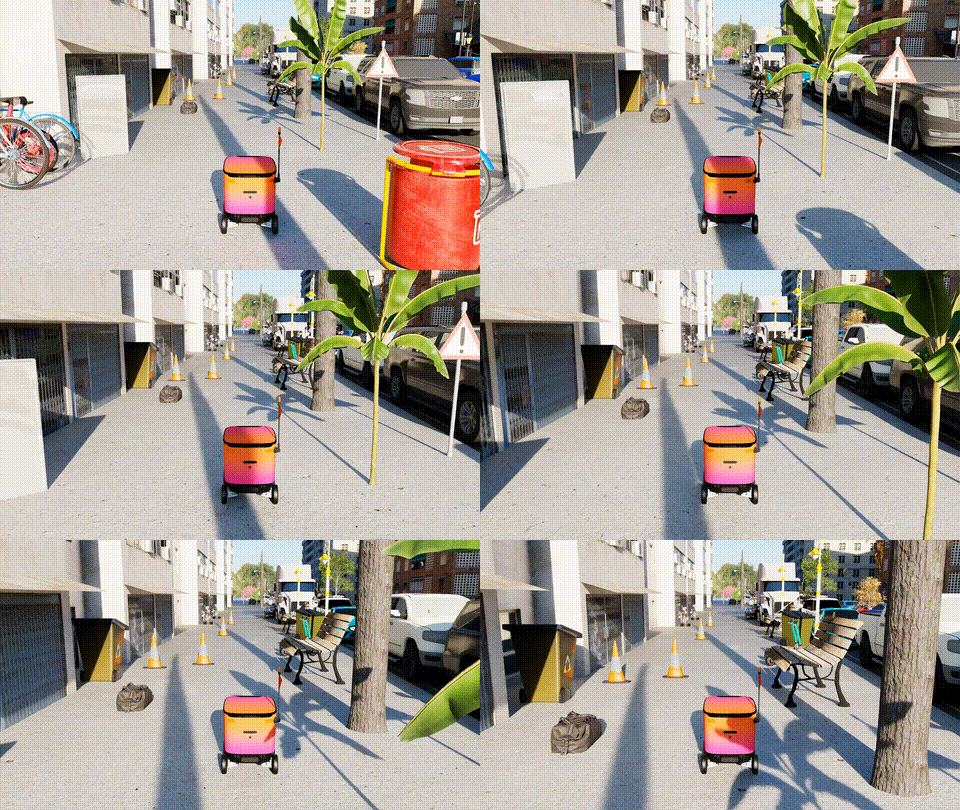
A correctly functioning installation should display a scene similar to the example below.
Troubleshooting#
If you encounter issues:
Confirm environment variables are set correctly:
echo $URBANVERSE_ASSET_ROOT
echo $URBANVERSE_SCENE_ROOT
Make sure Isaac Sim runs independently without errors
Ensure UrbanVerse-100K and UrbanVerse-160 downloads are complete
Fix module errors by re-running:
source _isaac_sim/setup_conda_env.sh
Check GPU driver, CUDA, and system requirements listed in the installation guide
For unresolved issues, consult the troubleshooting section of the UrbanVerse documentation or open a discussion with the community.